Where does our data go, and who can see it?
Every business gets its own Leo, with its own database in one region: Sydney today, or the US or the UK if your business needs it. Only the people you invite can see inside it, nothing is used to train AI, and you can delete it all. Here is the whole path, including the two services that sit outside your region.
Your business gets a Leo of its own, with its own database, kept in one region. Only the people you invite can see inside it. What it reads is never sold, never used for advertising and never used to train AI. You can switch off any tool, take any line out, or have the whole thing deleted.
That is the short answer. The rest of this page follows your data from the moment it arrives, so you can check each step for yourself.
Your Leo is yours alone
Each business has a private Leo: its own address, its own database, its own files and its own keys. One business's material is never stored with another's. Nothing Leo learns about your business is passed to any other.
Who can see inside
The people you invite, and nobody else. You invite people the way you would add a colleague to a shared folder.
Not the person who runs Leo. Leo's operator sees numbers for each business: its name, the email address that started it, when it was last used, how many people use it and what it costs to run. Leo gives him no screen where he can read your conversations, your files or what you have taught it.
If you want help inside your Leo, you invite him in, and he is there as your consultant, on your invitation. He also looks after the servers Leo runs on, and does not open them for your material unless you ask for help and agree to it, there is a security problem or abuse to investigate, or the law requires it.
The path your data takes
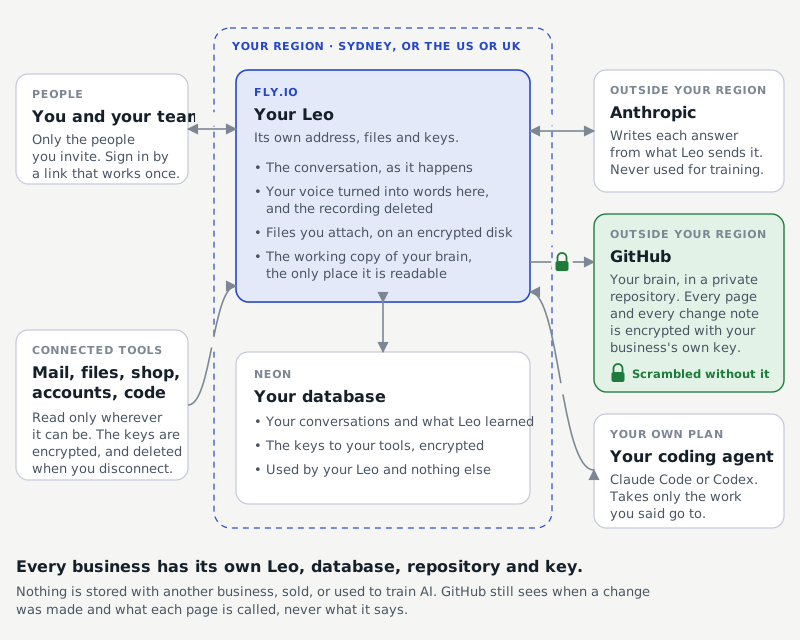
| What | Where it is kept |
|---|---|
| Your conversations with Leo, and what it read to answer | Your own database, with Neon, in your Leo's region |
| The keys to the tools you connect | Encrypted, in that same database. Deleted the moment you disconnect |
| Files you attach | With your Leo, on an encrypted disk in your Leo's region |
| The written record of how your business runs | A private repository for your business, on GitHub, encrypted with a key only your Leo holds |
| Leo itself | Fly.io, in your Leo's region |
| Writing each answer | Anthropic, the AI model Leo runs on |
Which region
Each business's data is kept in one region. Today that is Sydney. If your business needs its data held in the US or the UK, your Leo is set up there: your database, your files and Leo itself all sit in that region. Say so when you join, and there is nothing more for you to arrange.
The two that sit outside your region
Two services do not follow your region, and you should know which. GitHub holds the written record of how your business runs, and it is encrypted before it leaves your Leo. Every page and every note of what changed is scrambled with a key that belongs to your business and is held by your Leo alone, so GitHub, and anybody who opens the repository there, sees text nobody can read. GitHub can still see when a change was made and what each page is called, never what it says. Anthropic receives what Leo needs to write each answer. Under Anthropic's commercial terms, that material is not used to train its models.
What never reaches the record
Leo keeps two things apart. What you say about yourself stays with you. What you teach about the work goes into the written record, with your name on it. What Leo keeps private explains the difference.
Even inside the work, some things are kept out:
- Personal details from your mailbox. Email addresses, phone numbers and similar details Leo reads in your mail are never written into the record.
- Your voice. When you talk to Leo, the recording is turned into words on Leo's own server and then deleted. It is not sent to an outside transcription service.
- Anything a check would refuse. Every new line goes through a check before it is written. If something looks like it should not be there, Leo holds it back and asks you at your next message: keep it private, reword it, or take it out.
Reading, not changing
When you connect a tool, Leo reads. Your mailbox, calendar and files are connected read only: Leo holds no permission to send, change or delete anything in them. Where a tool's key does allow changes, Leo makes one only as part of work you have approved on the board. How connecting a tool works has the detail.
Taking things out
- One line. Tell Leo to forget it, and it comes off at once.
- One tool. Press Disconnect, and the key is deleted, not parked.
- Everything. Write to michael@smartleo.ai and your database, files and record are deleted within 30 days. You can ask for a copy of the record first.
How the doors are locked
Connections are encrypted in transit, stored keys are encrypted at rest, and the written record is encrypted in GitHub with your business's own key. You sign in with a link sent to your email address, which works once and expires after 15 minutes. Leo stores no passwords. Inside your Leo there is no analytics and no tracking cookie. The public website counts visits; your Leo does not.
What is not in place yet
Leo is in beta, and you should weigh that.
Not yet certified
Leo has no ISO 27001 certificate and no SOC 2 report. Those are independent audits of how a company manages security, and larger organisations often ask for them. We will seek them as Leo grows. Until then, this page and the privacy page are what we commit to, in writing.
Two more things are not built yet: single sign on through your organisation's identity provider, and a button to export your record yourself (ask, and we send it).
If your organisation holds sensitive personal information about the people it serves, such as donors, clients or members, you choose what Leo sees. Many teams start with the tools that show how the work runs, and connect the rest once they are comfortable.
If you are the one who approves software
The page for IT teams lists every permission Leo asks for, what each one allows, and how to approve or remove Leo across your organisation. If something is still unclear, write to michael@smartleo.ai and a person answers.