Privacy
What Leo collects, what it does with it, who else touches it, and how to have it removed.
Leo is an AI that learns how a business works from the people who run it, and helps run it. It is built and operated by Michael Berman in Sydney, Australia. Leo is in beta. This page describes what Leo does today, and it will change as Leo does. Questions go to michael@smartleo.ai.
The short version
- Each business has a private Leo of its own, with its own database. One business's material is never stored with another's.
- Leo reads the tools you connect. It does not sell what it reads, show ads against it, or pass it to anyone except the services named on this page that Leo runs on.
- Only the people you invite can see inside your Leo. The person who runs Leo sees numbers, not your conversations, and comes in only if you invite him.
- You can disconnect any tool at any time, and ask for everything to be deleted.
What Leo collects
What you tell it. Your name, role and email address, the name of your business, and everything you type, say or attach in a conversation with Leo.
What it reads from tools you connect. When you connect a tool, Leo reads from it to answer your questions and to understand how the business runs. What it reads depends on the tool and on what you ask.
What it needs to run. A cookie that keeps you signed in, and one that remembers which Leo is yours. A record of what was opened, connected and attached, without the contents, so a fault can be traced. Inside your Leo there are no advertising or tracking cookies, and no analytics.
On this website. The public pages at smartleo.ai, not your Leo, use Google Analytics to count visits: which pages are read, roughly where visitors are, and how they arrived. It sets a cookie to tell one visit from another. Nothing you say to Leo is ever part of it.
If you join the waitlist on this site, the name, email address, business and answers you give, and the country the request came from.
What Leo does with it
Leo uses what it collects to do the work you ask of it: to answer you, to build and keep a picture of how your business runs, to point out what it finds, and to carry out work you have approved. It uses your email address to sign you in and to write to you about your Leo. Nothing is used for advertising.
Who can see inside your Leo
The people you invite, and nobody else.
What the operator sees. For each business, the person who runs Leo sees its name, the email address that started it, when it was last used, how many people use it and what it costs to run. Leo gives him no screen where he can read your conversations, your files or your brain.
By invitation only. If you want help inside your Leo, you invite him in, the same way you invite a colleague. He is then there as your consultant, on your invitation.
The servers and the repository. Leo's operator does run the servers Leo sits on, and he administers the private GitHub repository each business's brain is kept in. He does not open either for a business's material unless you have asked for help and agreed to it, it is needed to investigate a security problem or abuse, or the law requires it.
Your Google account
Connecting Google is optional, and Leo works without it. If you connect it, this is all of what happens.
What Leo asks Google for. There are two separate sign ins, and you can use either, both or neither.
- Analytics, Search Console, Google Ads and Merchant Center. Leo reads your traffic and conversion reports, your search performance, your campaigns with their spend and dates, and your product feed with what is disapproved. Google has no read only permission for Google Ads or Merchant Center, so its consent screen says Leo may edit and delete there. Leo does not: it reads. The one exception is a single registration Google requires before it will let any app read a Merchant Center account, which Leo makes once.
- Gmail, Calendar and Drive. Read only. Leo reads messages, events and documents so it can answer questions about the business and learn who its customers are. It never sends, changes or deletes anything.
How Leo uses it. Only to provide Leo to you and the people you have invited into your Leo: to answer what you ask, and to understand the business you are teaching it about.
Where it is kept. The key Google gives Leo is encrypted and kept in your business's own database. What Leo reads becomes part of your conversation with it, kept in that same database. What Leo learns about how the business runs is written to your business's private record, which Leo calls its brain. Email addresses, phone numbers and other personal details from your mailbox are never written to the brain.
Who else touches it. To write an answer, Leo sends what it has read to Anthropic, whose AI model Leo runs on. Under Anthropic's commercial terms that material is not used to train its models. Leo itself is hosted with the services listed under Services Leo runs on. Google data is not transferred to anyone else, and is never sold.
No training on your data. Leo does not use data from your Google account to develop, improve or train generalised artificial intelligence or machine learning models.
People. Nobody at Leo reads data from your Google account unless you have asked for help and agreed to it, it is needed to investigate a security problem or abuse, or the law requires it.
Limited use. Leo's use and transfer to any other app of information received from Google APIs will adhere to the Google API Services User Data Policy, including the Limited Use requirements.
Switching it off. Press Disconnect beside Google on the Connections page in your Leo and the key is deleted at once. You can also remove Leo's access from Google's side, at myaccount.google.com/permissions.
Your Microsoft account
For a business on Microsoft 365, one sign in with Microsoft lets Leo read Outlook mail, the calendar, and the files you can open in OneDrive and SharePoint. Every permission is read only: Leo never sends, changes or deletes anything. It acts as you and sees only what you can already see.
Everything said above about your Google account holds here in the same way: what Leo reads is used only to provide Leo to your business, the key is encrypted in your own database and deleted when you disconnect, what it reads is sent to Anthropic to write an answer and is not used to train models, nobody at Leo reads it without your say so, and email addresses, phone numbers and other personal details from your mailbox are never written to the brain.
In a company, whether you can connect at all is your administrator's decision. The page written for them is Leo for IT teams.
Other tools you connect
The same rules apply to every tool: the key is encrypted in your own database, Leo reads what it needs for the work you ask of it, and disconnecting deletes the key. Where a tool's key allows changes, Leo makes a change only as part of work you have approved.
Services Leo runs on
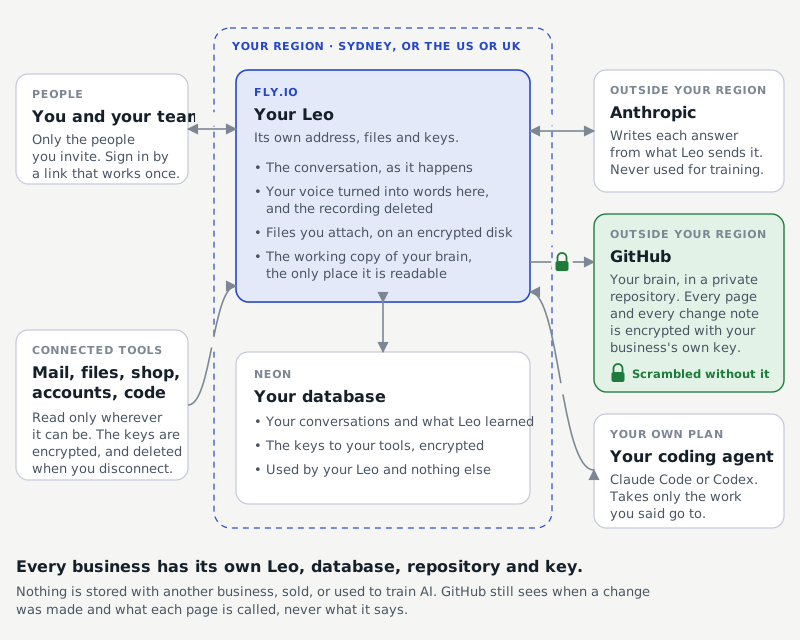
- Anthropic, the AI model that writes Leo's answers.
- Fly.io, where Leo runs, in Sydney, or in the US or the UK for a business that needs it.
- Neon, each business's database, in the same region as its Leo.
- GitHub, a private repository for each business's brain, encrypted with a key only that business's Leo holds. GitHub can see when a change was made and what each page is called, never what it says.
- Resend, which delivers Leo's emails.
- Cloudflare, which serves this website and holds waitlist requests.
- Google Analytics, which counts visits to this website only.
Voice and files
When you talk to Leo, the recording is turned into words on Leo's own server and then deleted. A file you attach is kept with your business's Leo so it can be read again, and is not written to the brain.
Keeping and deleting
Leo keeps what it has learned for as long as your business uses it. You can ask Leo to forget any line it has recorded, and it comes off at once. To close a Leo and have its database, files and brain deleted, write to the address above. It is done within 30 days, and you can ask for a copy of the brain first.
Security
Connections are encrypted in transit and stored keys are encrypted at rest. Each business's brain is encrypted before it reaches GitHub, with a key held by its own Leo alone. Each business's Leo holds only its own database, files and keys. Signing in is by a link sent to your email address, which works once.
Changes
When this page changes in a way that matters, the date at the top changes.